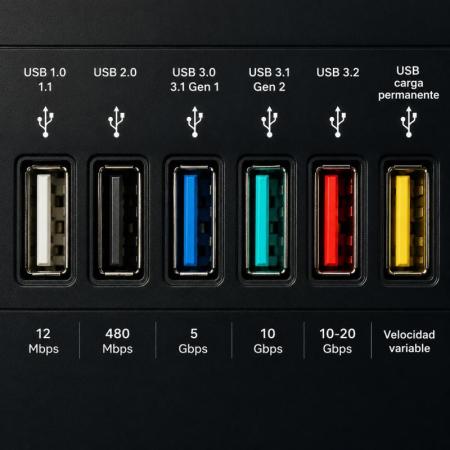
Colors of USB-A Connectors and Their Speeds
USB-A connectors have evolved over time not only in speed, but also in visual identification. Many manufacturers use different colors inside the USB port to indicate the generation, transfer speed, or special functions of the connector. Although these colors are not always part of an official mandatory standard, they have become a common reference on computers, TVs, gaming consoles, and other devices.
White — USB 1.0 / USB 1.1
- Maximum speed: 12 Mbps
- One of the earliest USB standards used for keyboards, mice, and older printers.
- Nowadays it is practically obsolete.
Black — USB 2.0
- Maximum speed: 480 Mbps
- For many years, this was the most common USB port.
- Widely used for flash drives, external storage devices, and basic peripherals.
Blue — USB 3.0 / USB 3.1 Gen 1
- Maximum speed: 5 Gbps
- Introduced a major speed improvement over USB 2.0.
- Very common on modern laptops and desktop PCs.
Teal or Light Blue — USB 3.1 Gen 2
- Maximum speed: 10 Gbps
- Offers double the speed of USB 3.0.
- Commonly used for external SSDs and large file transfers.
Red — USB 3.2
- Maximum speed: between 10 and 20 Gbps depending on the version
- Some manufacturers use red ports to indicate high-speed connections or fast charging capabilities.
- It may also mean the port can supply power even when the computer is turned off.
Yellow — Always-On Charging USB
- Speed: varies depending on the USB version
- Usually indicates ports capable of continuously supplying power to charge phones and other devices.
- It does not necessarily represent higher transfer speeds.
Conclusion
The colors of USB-A ports help users quickly identify the generation and capabilities of a connector, especially transfer speed and charging functions. Although some manufacturers use custom color schemes, most follow a fairly common logic: the newer and more vibrant the color, the greater the speed and additional features the USB port usually offers.